Appeler
From 3,99€ /month incl. VAT

NVMe VPS

NVMe VPS ideal for your web applications, databases and development environments. Benefit from exceptional performance with ultra-fast SSD NVMe storage, instant deployment to power your projects.

Ultra-fast NVMe
Xeon Gold CPUs
Websites & databases
From €3.99/mo incl. VAT
10 Gbit/s network
IPv4 & IPv6 included
10 Gbps · Bandwidth24/7 · SupportParis · NVMe
ssh@terminal
user@local:~$

Our NVMe VPS offers

Choose the configuration that matches your needs. All our VPS are equipped with ultra-fast NVMe storage.

★★★★★ Over 200+ clients recommend us

VPS Mini

VPS NVMe

3.99
/month incl. VATexcl. VAT 3.33
CPU1 vCore
RAM2 GB
NVMe25Go
Bandwidth10 Gbps
SSD NVMe
IPv4 included
IPv6 included
24/7 Support
Backup included
Anti-DDoS
Popular

VPS Starter

VPS NVMe

4.99
/month incl. VATexcl. VAT 4.16
CPU2 vCores
RAM4 GB
NVMe50Go
Bandwidth10 Gbps
SSD NVMe
IPv4 inclus
IPv6 inclus
Support 24/7
Backup inclus
Anti-DDoS
Popular

VPS Plus

VPS NVMe

7.99
/month incl. VATexcl. VAT 6.66
CPU4 vCores
RAM8 GB
NVMe80Go
Bandwidth10 Gbps
SSD NVMe
IPv4 inclus
IPv6 inclus
Support 24/7
Backup inclus
Anti-DDoS

VPS Max

VPS NVMe

14.99
/month incl. VATexcl. VAT 12.49
CPU6 vCores
RAM16 GB
NVMe100Go
Bandwidth10 Gbps
SSD NVMe
IPv4 inclus
IPv6 inclus
Support 24/7
Backup inclus
Anti-DDoS

VPS Flex

VPS NVMe

26.99
/month incl. VATexcl. VAT 22.49
CPU8 vCores
RAM24 GB
NVMe160Go
Bandwidth10 Gbps
SSD NVMe
IPv4 inclus
IPv6 inclus
Support 24/7
Backup inclus
Anti-DDoS

VPS Ultimate

VPS NVMe

34.99
/month incl. VATexcl. VAT 29.16
CPU12 vCores
RAM32 GB
NVMe200Go
Bandwidth10 Gbps
SSD NVMe
IPv4 inclus
IPv6 inclus
Support 24/7
Backup inclus
Anti-DDoS

For Windows or CPU-intensive workloads, also discover Windows VPS RDP and AMD Ryzen VPS.

Systèmes d'exploitation

Debian Logo
Ubuntu Logo
AlmaLinux Logo
Rocky Linux Logo
Fedora Logo

Comfortable management of your VPS

Switch ISO, adjust your firewall or manage reverse DNS without ever touching the command line.
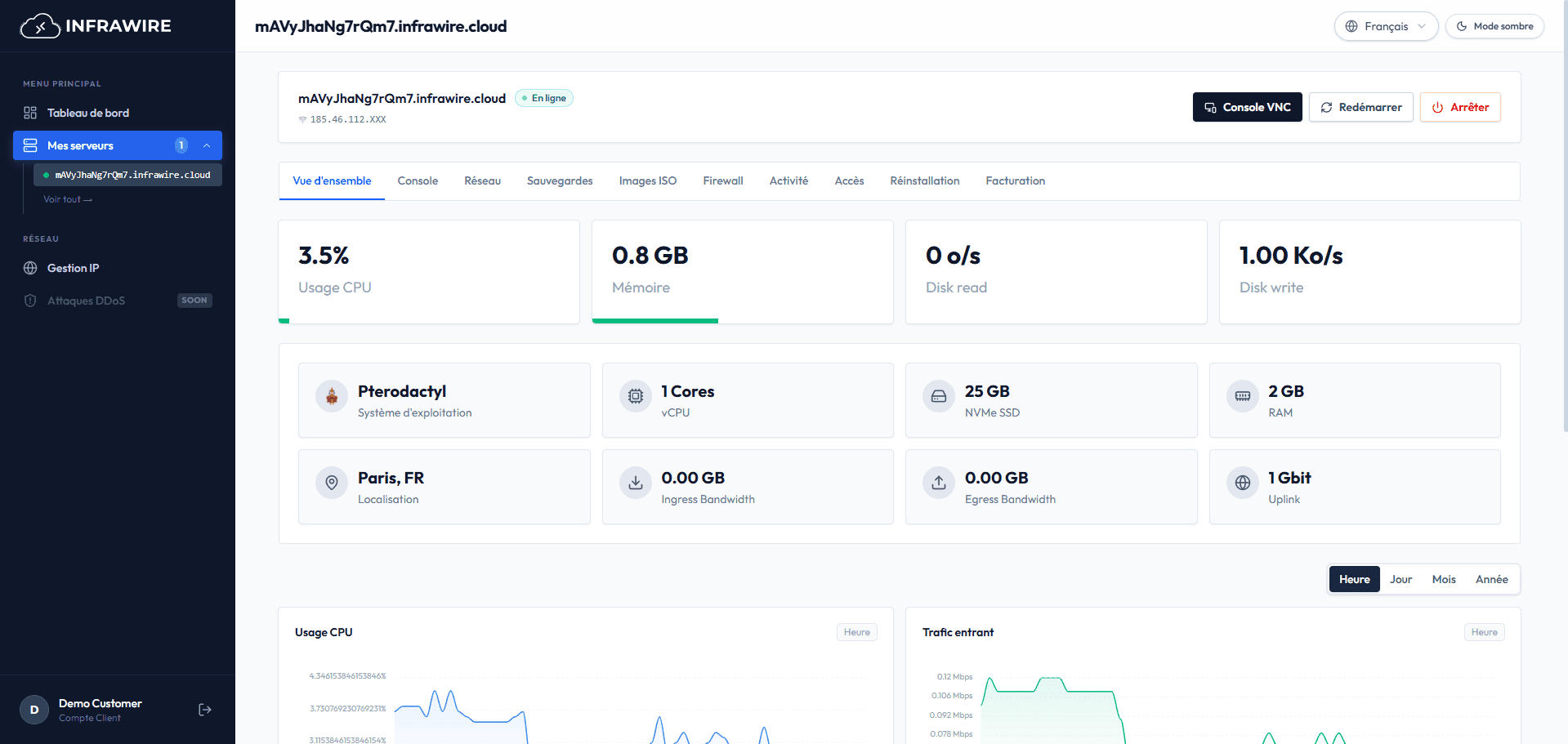
Overview

Recommended Documentation

Discover our guides and tutorials for Linux VPS

Intermediate

Secure SSH connection

Complete guide to secure your SSH connection by changing the port and configuring additional security options to prevent brute force attacks.

#SSH#Security#Bruteforce
Intermediate

Install UFW

Complete guide to install and configure UFW (Uncomplicated Firewall) on your Linux VPS server to secure your services.

#Security#UFW#Firewall
Intermediate

Install Docker

Complete guide to install Docker and Docker Compose on your Linux VPS. Docker allows creating, deploying, and running applications in isolated containers.

#Docker#Containers#Virtualization
Beginner

Install Nginx with Certbot

Complete guide to install Nginx and configure a free SSL certificate with Certbot to set up your own secure website.

#Nginx#SSL#Certbot
Intermediate

Install WordPress

Complete guide to install WordPress on your Linux VPS with LAMP (Linux, Apache, MySQL, PHP) or LEMP (Linux, Nginx, MySQL, PHP). Complete and secure configuration.

#WordPress#CMS#Website
Intermediate

Install WireGuard VPN

Complete guide to install and configure WireGuard VPN on your VPS server with a simplified script. Create your own private VPN network.

#VPN#WireGuard#Security
Beginner

Configure Paris timezone

Simple guide to configure your VPS timezone to Paris (Europe/Paris) to ensure correct system time synchronization.

#System#Timezone
Beginner

Test VPS bandwidth

Complete guide to test download, upload speed and latency of your VPS with Speedtest to check network performance.

#Network#Bandwidth#Speedtest
Beginner

Install Node.js and npm

Install Node.js LTS and npm on Ubuntu or Debian with NodeSource, verify versions, and run JavaScript apps on your VPS.

#Node.js#npm#Development
Intermediate

Install PostgreSQL

Install PostgreSQL, create a database user and database, connect locally, and apply basic security hardening.

#PostgreSQL#Database#SQL
Intermediate

Configure Fail2ban

Install Fail2ban to temporarily ban IPs after repeated failures on SSH or other services, alongside your firewall.

#Fail2ban#Security#SSH
Beginner

Install Redis

Install Redis for cache, sessions, or queues: enable the service, use redis-cli, local binding, and security basics.

#Redis#Cache#Database
Advanced

Install and secure mailcow

Full Docker mail stack (Postfix, Dovecot, Rspamd, web UI): official prerequisites, DNS, startup and hardening per mailcow documentation.

#Mailcow#Docker#Email

Questions

Everything you need to know about our NVMe VPS

Nos VPS NVMe sont activés automatiquement en moins de 5 minutes après validation de votre commande. Vous recevrez immédiatement les informations de connexion par email.

Oui, vous pouvez faire évoluer votre VPS à tout moment : CPU, RAM, stockage et bande passante. Les modifications sont effectuées sans interruption de service.

Absolument ! Nos SSD NVMe offrent des vitesses jusqu'à 10x supérieures aux SSD classiques, avec des latences ultra-faibles pour des performances optimales.

Oui, tous nos VPS incluent des sauvegardes automatiques quotidiennes conservées 7 jours. Des sauvegardes supplémentaires sont disponibles sur demande.

Oui, vous avez accès à notre bibliothèque complète d'images : Ubuntu, Debian, CentOS, Windows Server, et bien d'autres distributions.

La facturation s'effectue mensuellement à l'avance. Nous acceptons les paiements par carte bancaire, virement et PayPal. Des remises sont disponibles pour les engagements annuels.